The Custom Function node is a very powerful extension node within Unity's visual shader creation tool Shader Graph that allows you to write HLSL code directly or import it from an external file to execute your own shading processing or advanced mathematical expressions.
Real-world analogy: Injecting a "secret spice" into a ready-made cooking kit
The role of the Custom Function node can be compared to "Injecting a chef's own "secret spice (HLSL handwritten code)" into the cooking process using a ready-made cooking kit (visual node)."
- Conventional (implementation using nodes only): When you want to make a very complex original sauce (ray marching or special noise) at a restaurant, you need to line up over 100 ready-made ketchup or mayonnaise bottles (basic Math nodes) and forcibly connect them with complicated tubes (node connections). The table is covered in spaghetti with tubes and you don't know where to fix it.
- Solution with Custom Function: Concisely write the "secret blending procedure (HLSL code)" in the recipe card and pack it into one special spice bottle (Custom Function node). Just add a drop of this to your cooking kit to clear out spaghetti bottles and tubes and create the highest quality original sauce in an instant.
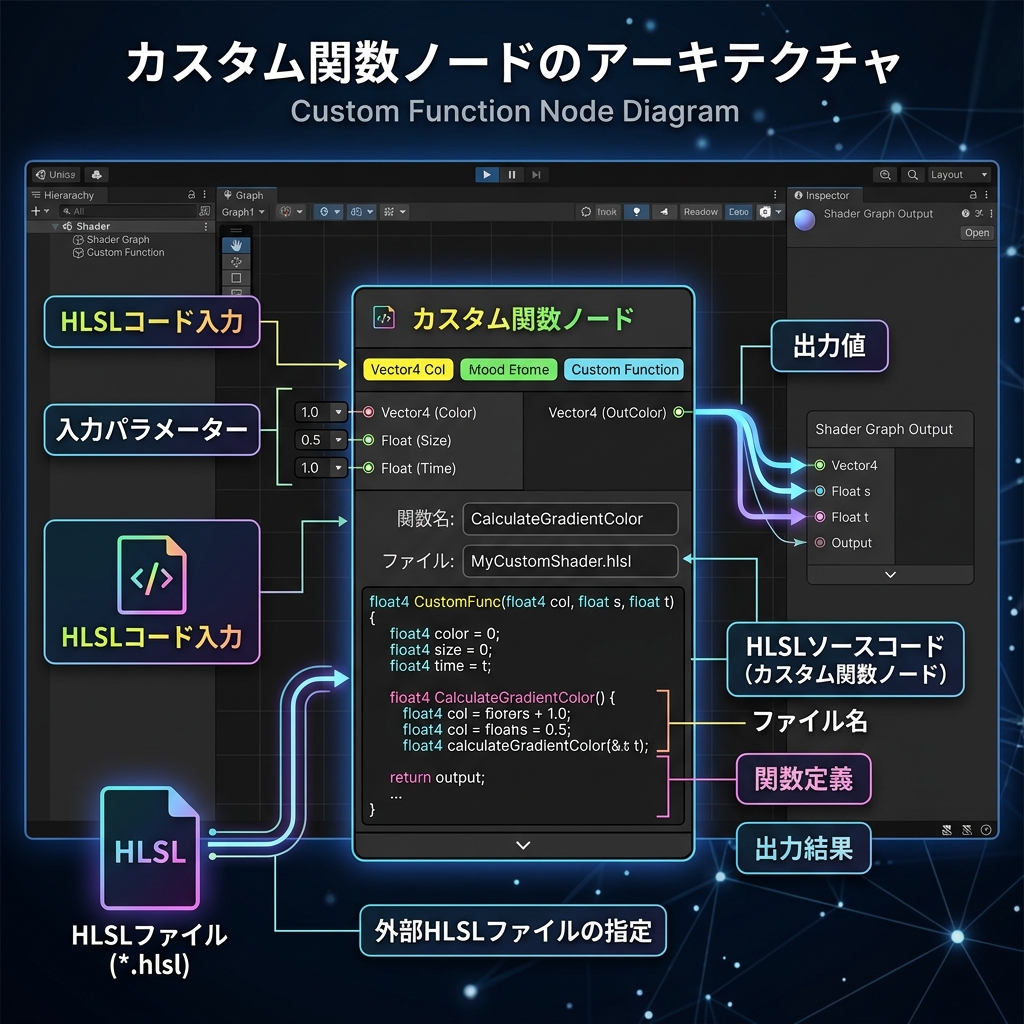
Illustration: Conceptual infographic of the Custom Function node that incorporates your own HLSL function into the flow of the Shader Graph node
Mechanism and operating principle
You can select either "String (write code directly in the node)" or "File (load external .hlsl file)" for the "Type" property of the Custom Function node. If you set the variable names and types of the input and output ports correctly, Shader Graph will automatically inject your HLSL function block into the global scope of your code when it compiles (generates) the final shader code.