One of the most persistent performance hurdles in Unity game development is "Garbage Collection (GC) spikes," which lead to micro-stuttering. When objects that spawn and die rapidly—such as shooting game bullets, hit effects, or floating damage text—are handled using simple Instantiate and Destroy, the heap memory quickly fragments. This causes the garbage collector to freeze the main thread periodically, ruining the player's experience.
This article explains the mechanics behind why frequent creation and destruction degrade performance, and introduces a step-by-step guide to implementing the **Object Pool pattern** using Unity's built-in UnityEngine.Pool APIs (introduced in Unity 2021.1+).
1. The Root Cause: Overhead of Instantiate/Destroy & Memory Fragmentation
While Instantiate and Destroy are user-friendly APIs, they trigger complex operations under the hood, making them very expensive to run frequently.
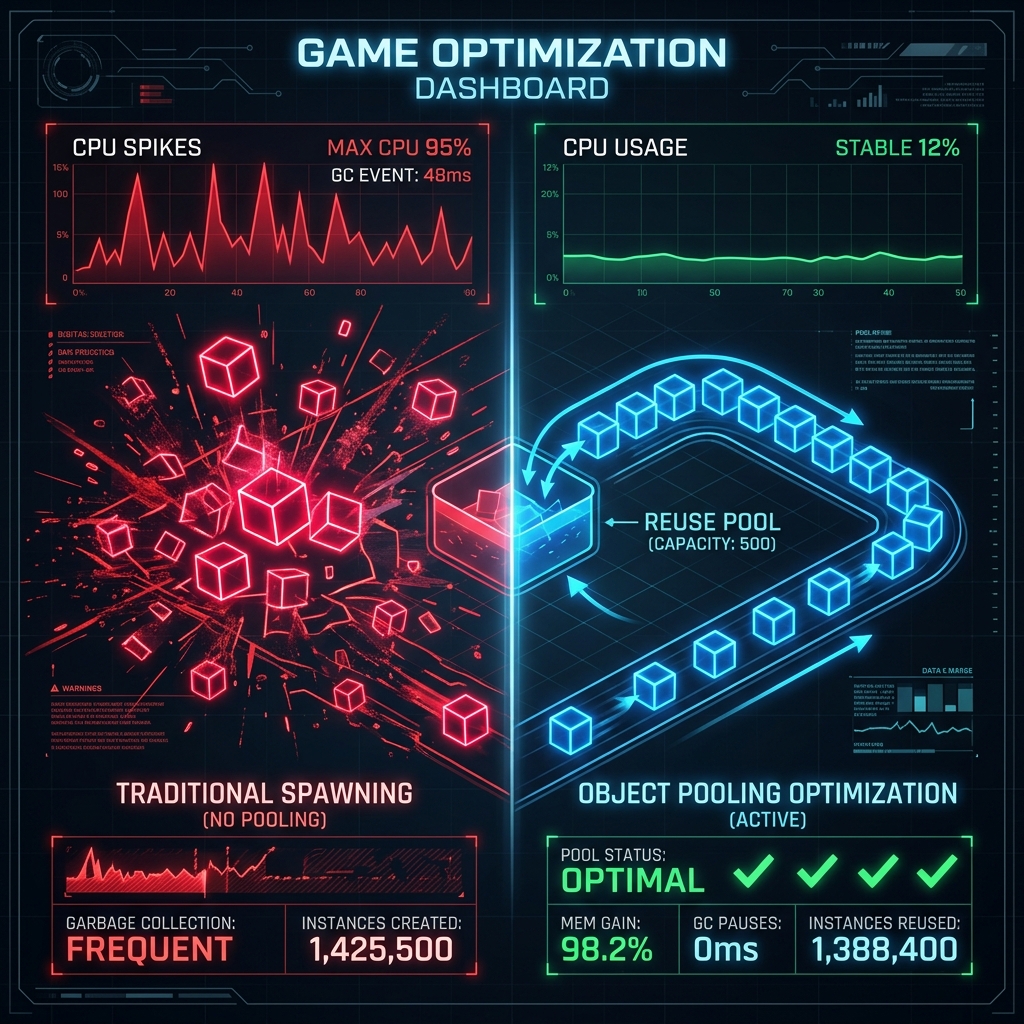
Figure: GC spikes caused by spawning/destroying vs. stable memory footprint via Object Pool
Spawning and destroying objects harms performance in three major ways:
- Serialization and Deserialization Overhead: Calling
Instantiateforces Unity to read serialized data from the source Prefab asset, allocate memory, and instantiate the GameObject along with its components. This happens synchronously on the main thread, resulting in noticeable frame drops if executed in bulk. - Transform Hierarchy Rebuilding: Adding a new object to a scene or removing it requires Unity to recalculate and realign transform hierarchy arrays. This update cost (Transform hierarchy update) scales exponentially as the number of child objects increases.
- GC Allocations and Memory Fragmentation: Spawning objects allocates memory on the Mono/IL2CPP heap. Conversely, calling
Destroydoes not immediately release that memory back to the OS. It remains as garbage until the next Garbage Collection sweep, which stops the world (thread freeze). Over time, repeating allocation and deallocation of different-sized blocks causes "fragmentation," leading to heap expansion and high memory consumption even if the actual active memory usage is low.
2. Solution: Building an Object Pool with UnityEngine.Pool
An **Object Pool** addresses these issues by instantiating a set of objects beforehand, keeping them inactive in a "pool," activating them when needed, and deactivating them to return them to the pool once they are done.
Unity 2021.1+ provides a standard generic implementation via UnityEngine.Pool.ObjectPool, removing the need to write custom pooling classes from scratch.
Example 1: The Pooled Object (e.g., Bullet class)
First, implement the object to be pooled (the bullet). The object holds a reference to its source pool, enabling it to return itself to the pool when its lifecycle ends (e.g., on timer expiration or hitting an enemy).
using UnityEngine;
using UnityEngine.Pool;

public class Bullet : MonoBehaviour
{
    private IObjectPool<Bullet> originPool;
    [SerializeField] private float speed = 20f;
    [SerializeField] private float lifeTime = 2f;
    private float timer;

    // Initialize with a reference to the pool
    public void SetPool(IObjectPool<Bullet> pool)
    {
        originPool = pool;
    }

    private void OnEnable()
    {
        timer = 0f;
    }

    private void Update()
    {
        transform.Translate(Vector3.forward * speed * Time.deltaTime);

        timer += Time.deltaTime;
        if (timer >= lifeTime)
        {
            ReleaseToPool();
        }
    }

    private void OnTriggerEnter(Collider other)
    {
        // Return to pool upon collision
        ReleaseToPool();
    }

    private void ReleaseToPool()
    {
        if (originPool != null)
        {
            // Deactivate and return to the pool
            originPool.Release(this);
        }
        else
        {
            // Fallback if not managed by a pool
            Destroy(gameObject);
        }
    }
}
Example 2: The Spawner / Pool Manager
Next, write a manager class that instantiates ObjectPool and defines the callbacks for spawning, retrieving, returning, and destroying pool objects.
using UnityEngine;
using UnityEngine.Pool;

public class BulletSpawner : MonoBehaviour
{
    [SerializeField] private Bullet bulletPrefab;
    [SerializeField] private int defaultCapacity = 20;
    [SerializeField] private int maxPoolSize = 100;

    private IObjectPool<Bullet> bulletPool;

    private void Awake()
    {
        // Initialize UnityEngine.Pool.ObjectPool
        bulletPool = new ObjectPool<Bullet>(
            createFunc: CreateBulletInstance,          // Callback to instantiate new objects when pool is empty
            actionOnGet: OnTakeBulletFromPool,        // Callback when retrieving an object from the pool
            actionOnRelease: OnReturnBulletToPool,    // Callback when returning an object to the pool
            actionOnDestroy: OnDestroyPoolObject,     // Callback to destroy objects exceeding the pool size limit
            collectionCheck: true,                     // Throw exceptions on duplicate releases (Debug check)
            defaultCapacity: defaultCapacity,          // Default initial array capacity
            maxSize: maxPoolSize                       // Maximum pool size limit
        );
    }

    // Instantiate callback
    private Bullet CreateBulletInstance()
    {
        Bullet instance = Instantiate(bulletPrefab);
        instance.SetPool(bulletPool); // Pass pool reference to the bullet instance
        return instance;
    }

    // Retrieval callback
    private void OnTakeBulletFromPool(Bullet bullet)
    {
        bullet.gameObject.SetActive(true); // Activate the object
    }

    // Release callback
    private void OnReturnBulletToPool(Bullet bullet)
    {
        bullet.gameObject.SetActive(false); // Deactivate the object
    }

    // Destruction callback (called when pool capacity is exceeded)
    private void OnDestroyPoolObject(Bullet bullet)
    {
        Destroy(bullet.gameObject); // Clean up the physical object from memory
    }

    // Public method to fire a bullet
    public void FireBullet(Vector3 position, Quaternion rotation)
    {
        // Get an instance from the pool (triggers CreateBulletInstance internally if empty)
        Bullet bullet = bulletPool.Get();

        // Position and rotate the bullet
        bullet.transform.position = position;
        bullet.transform.rotation = rotation;
    }
}
3. Bad Practices to Avoid in Object Pooling
Even with an object pool, incorrect implementation details can negate the performance benefits or introduce unexpected bugs. Keep the following in mind:
1. Changing Transform Hierarchies (SetParent) on Get/Release
To keep the Hierarchy view clean, developers often nest active/inactive pooled objects under a "Pool_Root" transform parent. However, calling transform.SetParent forces Unity to recalculate the Transform tree, which is a surprisingly heavy operation. Doing this repeatedly for hundreds of bullets negates much of the pooling optimization.
Solution: Assign parents only once during object creation, or keep pooled objects at the root of the hierarchy and rely solely on activating/deactivating them.
2. Failing to Reset Object State (State Leakage)
Since object pooling recycles existing instances, states from the previous lifecycle (like velocity, timers, HP, and particle play states) persist, causing strange gameplay bugs when reused.
Solution: Reset all velocities, HP levels, physics states (e.g., Rigidbody velocity), and timers inside the retrieval method (or inside the object's OnEnable callback).
3. Double Releasing and Unclean References
If another script keeps a reference to a returned object and tries to modify its state or release it again (Double Release), the pool's internal list can get corrupted, throwing exceptions or causing objects to active/deactivate unexpectedly.
Solution: Enable collectionCheck: true in the ObjectPool constructor during development to throw an InvalidOperationException on double releases. Ensure you set local references to returned objects to null.
4. Advanced: Pooling Lists, StringBuilders, and Custom Collections
In addition to GameObjects, allocating temporary C# collections like List, Dictionary, or StringBuilder causes GC allocations. Unity 2021.1+ provides pools for these common C# structures too.
using UnityEngine;
using UnityEngine.Pool;
using System.Collections.Generic;

public class InventorySystem : MonoBehaviour
{
    public void UpdateInventoryUI()
    {
        // Use UnityEngine.Pool.ListPool to get a temporary list without allocation
        using (var pooledList = ListPool<string>.Get(out List<string> tempList))
        {
            // Perform operations on tempList
            tempList.Add("Sword");
            tempList.Add("Shield");

            foreach (var item in tempList)
            {
                Debug.Log(item);
            }
        } // The list is automatically cleared and returned to the pool when leaving the using scope
    }
}
Replacing expressions like new List in update loops or event triggers with ListPool or DictionaryPool is an easy way to optimize memory management and avoid garbage collector overhead.
5. Summary: Normal Lifecycle vs. Object Pooling
| Metric | Standard Instantiate / Destroy | Object Pooling (UnityEngine.Pool) |
|---|---|---|
| CPU Processing Time (Spikes) | High (triggers deserialization and transform tree recalculations every time) | Low (toggles activation states and performs light state resets) |
| GC Allocations | Frequent/Large (the root cause of GC spikes) | Zero (occurs only during initial pool generation or capacity expansion) |
| Memory Fragmentation | High (fragments heap space, leading to uncontrolled memory inflation) | Minimal (allocates fixed, reusable memory buffers) |
| Implementation Overhead | Minimal (requires only a single line of code) | Moderate (requires setup and lifecycle management code) |
In early project stages, prototype using simple instantiation. Once high-frequency objects are identified, refactor them using UnityEngine.Pool.ObjectPool to secure performance and structural scalability.