Find which stage stalls the frame
A screenshot or RenderTexture analysis can stall in GPU readback, image encoding or file writing. Measure those stages separately. This guide describes an investigation and design process using Unity 2022.3 LTS APIs; it does not claim a measured speedup on a particular device.
ReadPixels waits for GPU work
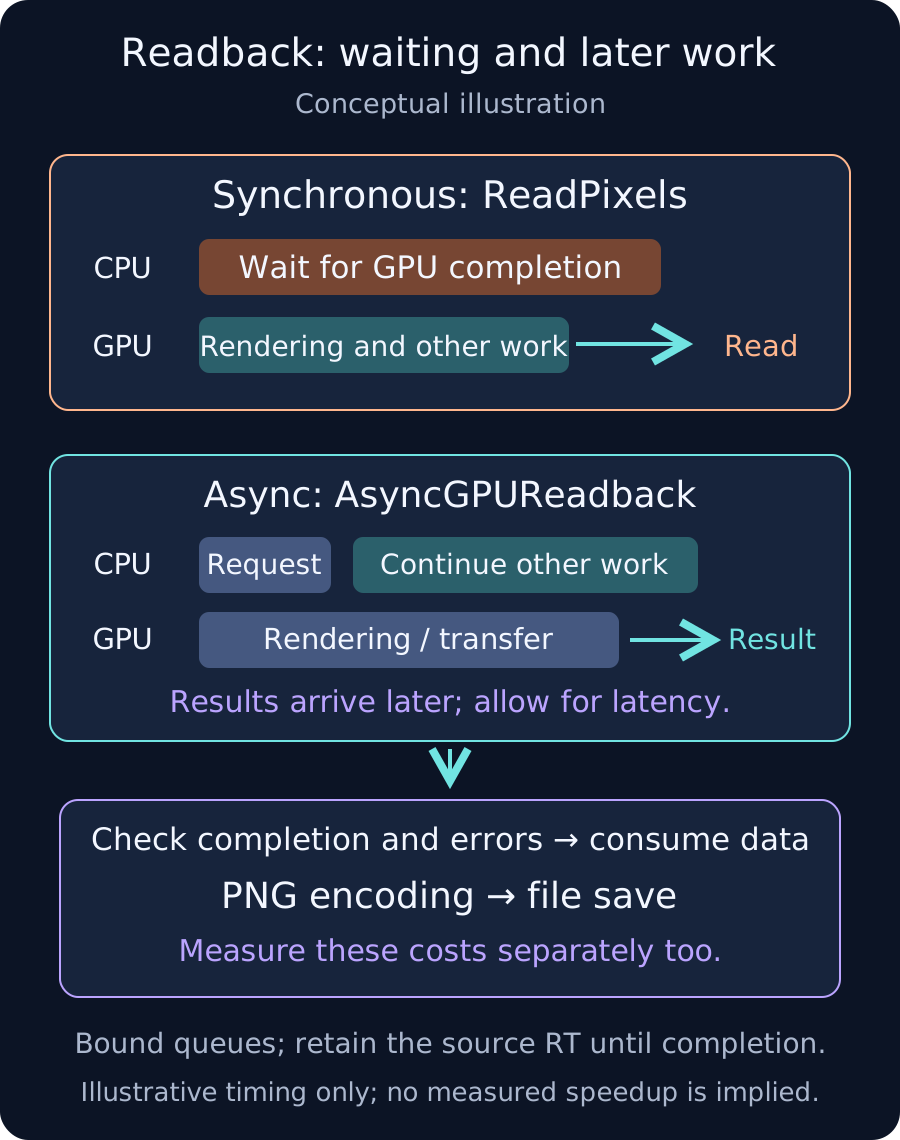
Texture2D.ReadPixels copies pixels from the active GPU render target into a CPU-side Texture2D. It waits for earlier GPU work to finish, which can stall the main thread. Reusing the destination texture can reduce allocations without removing this synchronization.
Separate rendering, readback, encoding and writing in the Profiler. Compare runs with saving and encoding disabled. Decide whether every frame is actually needed or whether capture on demand is sufficient.
Choose a path based on who needs the pixels
- For another material or UI display, consider keeping data on the GPU. Graphics.CopyTexture and Graphics.Blit serve different copying or processing needs and have compatibility constraints.
- For CPU analysis or file output that tolerates several frames of latency, consider AsyncGPUReadback. Do not require the result in the requesting frame.
- Check SystemInfo.supportsAsyncGPUReadback on the target. Define an appropriate fallback, such as disabling capture or using infrequent synchronous capture.
Manage requests and data lifetime
- Issue AsyncGPUReadback.Request at the appropriate point after the intended rendering. Check source bounds and readback-format support. In 2022.3, query SystemInfo.IsFormatSupported with FormatUsage.ReadPixels.
- Bound concurrent requests. For example, skip a capture while one request is pending, and define capture intervals and how stale results are discarded.
- Use a completion callback or check done, then check hasError before calling GetData. A successful request's result has a short lifetime: consume it at completion rather than keeping the request for later frames.
- Keep the source RenderTexture valid until completion. Do not ReleaseTemporary immediately after requesting a readback from a temporary RT. Handle pending requests during scene teardown too.
- Copy data needed by later frames or a save queue into an owned buffer. GetData returns a short-lived NativeArray view belonging to the request. Do not retain it indefinitely or Dispose it as if you had allocated it yourself.
Calling WaitForCompletion or WaitAllRequests immediately after Request introduces an immediate wait again. Let normal frame processing continue and consume the result later. GPU transfer bandwidth, destination memory and callback CPU work still have a cost.
Bound encoding and saving too
AsyncGPUReadback does not automatically make PNG encoding or file writing asynchronous. A large encode in the completion handler can still stall. Bound the save queue as well as the readback queue, and compare reduced capture resolution, region and frequency.
Before moving work to a worker thread, check the encoder API's thread-safety contract and buffer ownership. Do not place arbitrary Texture or other Unity API calls inside Task.Run.
Verify in the target Player
- Compare frame-time spikes and memory at the same capture resolution and frequency.
- Check that repeated captures do not grow pending requests, save queues or temporary RT allocations indefinitely.
- Inspect output orientation, color, alpha and HDR conversion. If using MSAA, check the resolve path into a single-sample readback RT.
- Exercise unsupported formats, failed requests, scene changes and shutdown cleanup.
An error-free Editor run does not prove target-device or graphics-API support and performance. Base the decision on Player measurements and the actual saved image.
References
- Texture2D.ReadPixels: synchronous GPU readback
- AsyncGPUReadback: behavior and latency
- AsyncGPUReadback.Request: formats and source lifetime
- AsyncGPUReadbackRequest: result lifetime
- AsyncGPUReadbackRequest.GetData
- SystemInfo.supportsAsyncGPUReadback
- RenderTexture.ResolveAntiAliasedSurface: MSAA resolve
- Unity C# reference source 2022.3: GetData buffer ownership