In Unity development, asynchronous processing (loading files, server communications, or timed animations) is indispensable. Instead of legacy Coroutines, many developers now adopt modern C# async/await or UniTask, a high-performance allocation-free async library optimized for Unity.
However, one of the most common issues in projects implementing async workflows is the occurrence of MissingReferenceException or ObjectDisposedException after an object is destroyed. This occurs when a scene transition or Destroy() deletes a GameObject holding the running script, but the background async operation continues to run and attempts to access destroyed UI elements or Transforms.
This article explains the underlying mechanism of these exceptions and provides a step-by-step guide and best practices for managing and canceling async task lifecycles safely using CancellationToken.
1. The Root Cause: The Lifecycle Disconnect Between C# Async Operations and Unity Objects
A Unity MonoBehaviour is tied to its GameObject's lifecycle. When a GameObject is destroyed, its native C++ counterpart is freed from memory. However, C# Task or UniTask runs on the C# runtime, independent of Unity's native object lifetime (GameObject.Destroy).
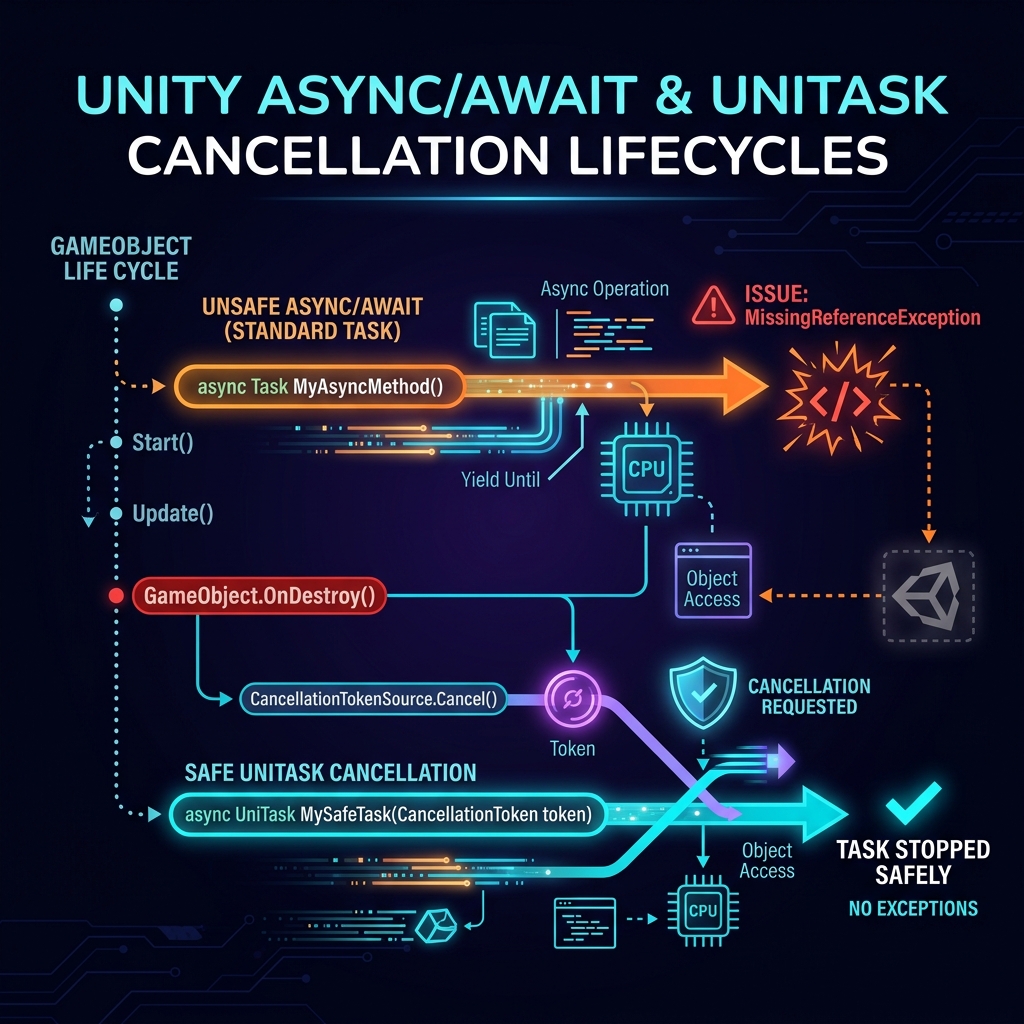
Figure: Async tasks continue running post-destruction, throwing null reference exceptions upon completion
When a GameObject is destroyed while an async method is awaiting, the following issues occur upon resumption:
- MissingReferenceException: Once the
awaitfinishes, the method resumes execution. If it tries to accessthis.gameObjector attached components (like Text or Image), Unity throws an exception because the underlying native C++ object is already gone. - Asynchronous Task Leaks: The task remains in memory until it completes or is aborted by an exception. Repeated scene transitions will pile up leaked network queries or timers, consuming CPU and memory.
- State Glitches: A leaked task might write fetched data back to a global singleton (like SaveManager or Inventory) long after the UI that requested the load has been destroyed, resulting in corrupted game states.
2. Solution 1: Safe Cancellation with GetCancellationTokenOnDestroy()
The standard way to avoid async leaks in Unity is to pass a CancellationToken to async methods, allowing them to abort immediately when the hosting object is destroyed.
UniTask provides a convenient extension method GetCancellationTokenOnDestroy() for MonoBehaviour, which automatically binds a token to the object's `OnDestroy` lifecycle.
Simple UniTask Implementation
using System;
using System.Threading;
using Cysharp.Threading.Tasks;
using UnityEngine;
using UnityEngine.UI;

public class AsyncLoader : MonoBehaviour
{
    [SerializeField] private Text statusText;

    private void Start()
    {
        // Start async task passing the token tied to this script's lifetime
        LoadDataAsync(this.GetCancellationTokenOnDestroy()).Forget();
    }

    private async UniTaskVoid LoadDataAsync(CancellationToken cancellationToken)
    {
        try
        {
            statusText.text = "Loading...";

            // 1. Pass CancellationToken to awaitable methods
            await UniTask.Delay(TimeSpan.FromSeconds(3), cancellationToken: cancellationToken);

            // If the GameObject is destroyed during delay, execution stops here
            statusText.text = "Load Completed!";
        }
        catch (OperationCanceledException)
        {
            // Optional: Handle cleanup on cancellation
            Debug.Log("Data load cancelled because the GameObject was destroyed.");
        }
    }
}
How it works: If the GameObject is destroyed during the UniTask.Delay wait, the token supplied by GetCancellationTokenOnDestroy() shifts to a cancelled state. The await immediately throws an OperationCanceledException, skipping the subsequent statusText.text = "Load Completed!"; line and exiting the method safely.
3. Solution 2: Gracefully Handling OperationCanceledException
In standard C# async architectures, cancellation is reported by throwing an OperationCanceledException. However, you might want to suppress these red exception warnings from cluttering Unity's console.
UniTask provides utilities to handle cancellation without throwing exceptions.
1. SuppressCancellationThrow
Append .SuppressCancellationThrow() to the awaitable task. This catches the exception internally and returns a boolean status flag (IsCanceled).
private async UniTaskVoid LoadDataSafeAsync(CancellationToken cancellationToken)
{
    statusText.text = "Loading...";

    // Await without throwing exceptions, checking the boolean result
    bool isCanceled = await UniTask.Delay(TimeSpan.FromSeconds(3), cancellationToken: cancellationToken)
        .SuppressCancellationThrow();

    // If cancelled, exit early and safely
    if (isCanceled)
    {
        return;
    }

    // This line only runs if the GameObject is still alive and active
    statusText.text = "Load Completed!";
}
This avoids nested try-catch blocks, keeping your async code clean and clean console logs.
2. Safety of UniTaskVoid.Forget()
When you call a UniTaskVoid method and append .Forget(), any OperationCanceledException thrown inside is automatically caught and discarded by UniTask's scheduler (meaning it won't write an error log). Any other unexpected errors (like NullReferenceException) will still print to the console as usual.
4. Bad Practices and How to Avoid Them
1. Leaking CancellationTokenSource
If you implement manual cancellations (e.g., stopping a task when a player clicks a 'Cancel' button), you must instantiate your own CancellationTokenSource. Failing to Dispose() it will cause memory leaks.
// BAD: The source is never disposed, causing a memory leak
private CancellationTokenSource cts;

private void StartTask()
{
    cts = new CancellationTokenSource();
    DoSomethingAsync(cts.Token).Forget();
}

private void CancelTask()
{
    cts?.Cancel();
    // Missing cts.Dispose()!
}
Solution: Always call Dispose() when canceling or destroying the script. Clear and nullify the reference like: cts.Dispose(); cts = null; before allocating a new one.
2. Omitting Tokens from Standard Task.Delay
When using standard C# System.Threading.Tasks.Task instead of UniTask, developers often pass the token to the parent method but forget to forward it to Task.Delay or Task.Run.
// BAD: The token is defined but never forwarded to Task.Delay
private async Task LoopTask(CancellationToken ct)
{
    while (!ct.IsCancellationRequested)
    {
        await Task.Delay(1000); // <- Missing CancellationToken!
        Debug.Log("Tick"); // Keeps printing even after object destruction
    }
}
Solution: Always pass the CancellationToken to all awaitable operations (e.g., await Task.Delay(1000, ct)).
3. Forgetting Manual Checkpoints in Heavy Loops
An async method will not check for cancellations unless it hits an await statement. For loops performing heavy math computations, the thread will lock and complete regardless of cancellation states.
Solution: Manually call cancellationToken.ThrowIfCancellationRequested() inside heavy loops to exit immediately if requested.
private async UniTask HeavyCalculationAsync(CancellationToken ct)
{
    for (int i = 0; i < 100000; i++)
    {
        // Check for cancellation manually at start of iteration
        ct.ThrowIfCancellationRequested();

        // Execute heavy math
        DoHeavyWork(i);

        if (i % 1000 == 0)
        {
            await UniTask.Yield(PlayerLoopTiming.Update, ct);
        }
    }
}
5. Summary: Comparison of Cancellation in Task and UniTask
| Feature | Standard async/await (Task) | UniTask |
|---|---|---|
| Destruction Token Acquisition | Must manually write cts.Cancel() inside OnDestroy() |
Trivial using this.GetCancellationTokenOnDestroy() |
| GC Allocations | High (allocates Task objects and switches threads) | Zero Alloc (Struct-based async engine) |
| Exception Suppression | No (always requires try-catch handling) |
Easy with .SuppressCancellationThrow() |
| Unity Lifecycle Bindings | None (pure standard C# library) | Rich (PlayerLoop, coroutines, tweening, and physics) |
Always remember the golden rule of Unity async programming: "Async tasks do not stop automatically when GameObjects are destroyed." By adopting `GetCancellationTokenOnDestroy()` as a project standard and propagating tokens to all awaits, you can eliminate memory leaks and random reference crashes from your Unity builds.