VRS and Multiview are the main optimizations to reduce the drawing load in the development of standalone VR games for Meta Quest 2/3, but prompt debugging is required because drawing deviations (shading bugs) caused by rapid head rotation cause severe VR sickness in the player.
Specific solution
1. Change Foveated Shading Mode
Edit ➔ Project Settings ➔ XR Plug-in Management ➔ Oculus Open the settings screen. Expand the Android Platform Settings tab and switch **`Foveated Shading Mode`** from `Dynamic` to **`Fixed`**.
2. Safety adjustment of Foveation Level
In order to completely suppress the blurring when swinging, readjust the VRS resolution reduction rate **`Foveation Level`** to **`Medium` or `Low`** instead of the highest `High (Top)`. This equalizes the pixel shading reduction rate for peripheral vision and completely eliminates flickering due to Vulkan driver bugs (coordinate shifts during reprojection).
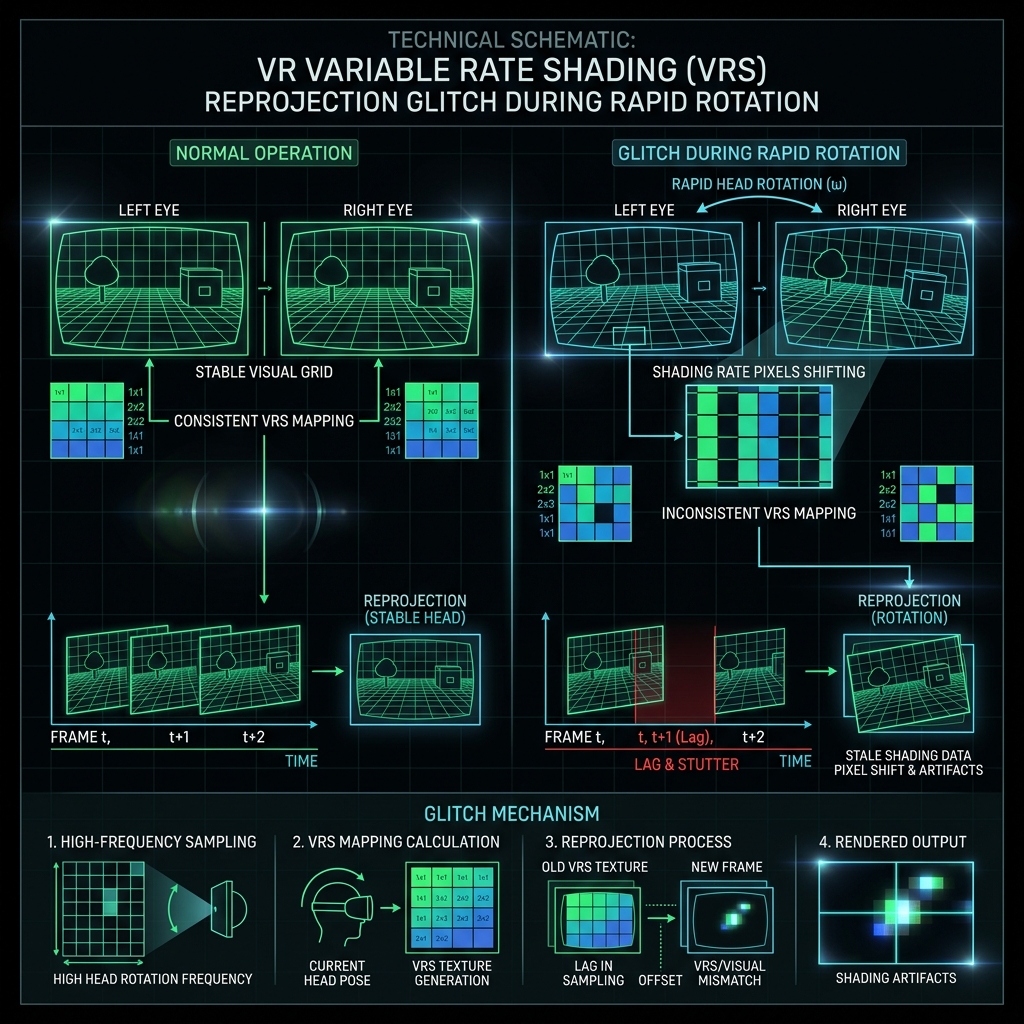
Figure 1: Bug mechanism of eye coordinate system and reprojection deviation in VRS (peripheral vision resolution reduction)