Identify the operation that increases Material count
If changing colors or repeatedly creating and destroying objects grows Material count, search for Renderer.material, Renderer.materials and new Material. Diagnostic logging that reads material also counts as an access. This guide uses Unity 2022.3 LTS as its reference.
1. Understand private copies on material access
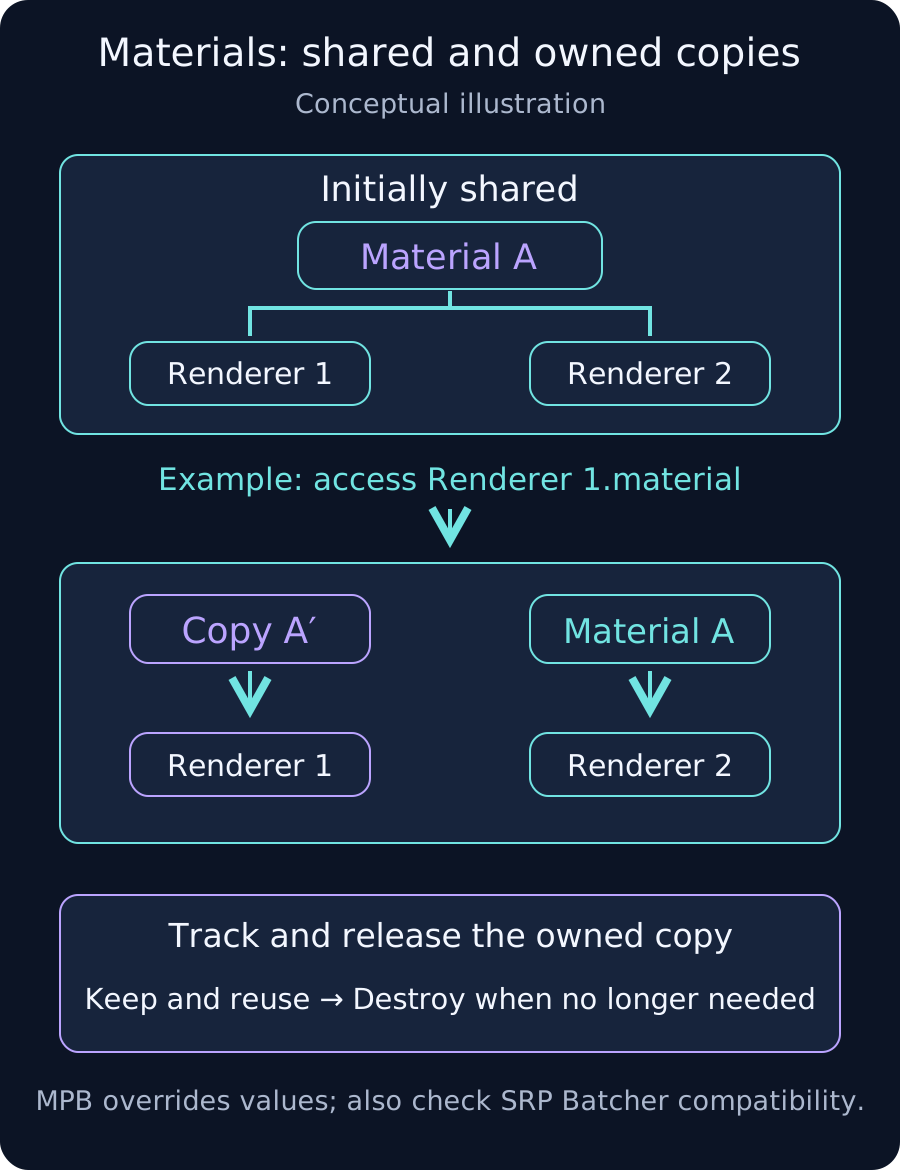
Renderer.material returns an instance used by that renderer. Accessing it while the renderer uses a shared material can create a private copy. In the diagram, only Renderer 1 switches to A′; Renderer 2 keeps A.
Repeated getter calls on the same renderer already retaining an instance do not necessarily create a new Material every time. Trace first access on new renderers, reassignment, explicit cloning and cleanup. Renderer.materials can instantiate materials too; consider sharedMaterials when inspecting slot references.
2. Separate assigning references from editing shared values
Assigning an existing asset to renderer.sharedMaterial changes that renderer's reference. Calling SetColor on the returned sharedMaterial changes the shared Material itself and can affect every renderer using it. Distinguish these operations to avoid unintentionally editing a project asset.
For a few fixed variations, pre-authored Material assets may be suitable. When switching renderers back to shared assets, check whether private copies created earlier still need cleanup.
3. Choose a method for the required difference
- Existing asset: assign a shared reference for a fixed appearance. Avoid editing a shared asset's color merely to customize one object.
- Property override: consider MaterialPropertyBlock for supported colors or floats. Reuse the block and check the actual shader property, such as _BaseColor for URP/Lit base color.
- Private Material: when unique configuration or render state is required, give cloning a clear owner. Retain and reuse the reference, then Destroy it when no longer needed. Shared project assets are outside that cleanup set.
MaterialPropertyBlock does not support changing render state and is incompatible with the 2022.3 SRP Batcher. Fewer Material instances alone do not establish a performance improvement; compare rendering behavior and CPU time.
4. Check override scope and ownership
If several systems write PropertyBlocks, coordinate the owner and material slot. When both renderer-wide and per-material blocks exist, the per-material block takes precedence for that slot. Investigate other writers and slot precedence when a color unexpectedly returns.
Before releasing a private copy, remove references or restore an appropriate material. For pooled objects, consider retaining the same owned copy during reuse and releasing it when the pool finally destroys the object. Do not destroy a copy while other renderers still use it.
Verify repeatability and rendering cost
- Compare Material count and memory before creation, after creation and after destruction in the same target Player scenario.
- Repeat the cycle and check whether retained count stabilizes. Compare after destruction has been processed rather than only immediately after Destroy.
- Separate intentional pool retention from unreferenced growth. Editor temporary resources and project assets are not all evidence of a leak.
- Use the Frame Debugger and Profiler to compare SRP Batcher status, CPU time and appearance.
Private Material instances can be intentional. Verify their creation count, sharing and lifetime against the design.
References
- Renderer.material: instantiated materials
- Renderer.materials: instance array and cleanup
- Renderer.sharedMaterial: shared state
- MaterialPropertyBlock: supported uses
- Renderer.SetPropertyBlock: scope and precedence
- Unity 2022.3: SRP Batcher compatibility
- Object.Destroy: destruction timing
- URP Lit source: _BaseColor property