Render Queue is an integer parameter that controls the absolute order in which Unity renders (draws) objects on the scene. This allows the graphics card (GPU) to determine exactly which objects to draw first and which to layer later.
Real-world analogy: Processing order of order slips in a restaurant
The Render Queue mechanism can be compared to "the absolute order of processing order slips in a restaurant kitchen (order priority group)".
- Conventional (no Queue control): The order in which dishes (objects) are served on the table is different. If the dessert (semi-transparent particles) is served first, followed by the main dish (opaque ground or buildings), the tabletop (screen) will be messed up and the dessert will be hidden under the main dish (broken draw order).
- Solution by Render Queue: Strictly write the "group number (Queue value)" in the order slip. First, prepare "Group A: Soup and Main (Geometry: 2000)" for everyone and set it on the table. After that, we will standardize the cooking order in the kitchen so that "Group B: Dessert and Glass (Transparent: 3000)" is always served one after the other. This allows the dishes to be arranged in a beautiful order no matter who sees it, and the main dish can be seen through the (semi-transparent) glass.
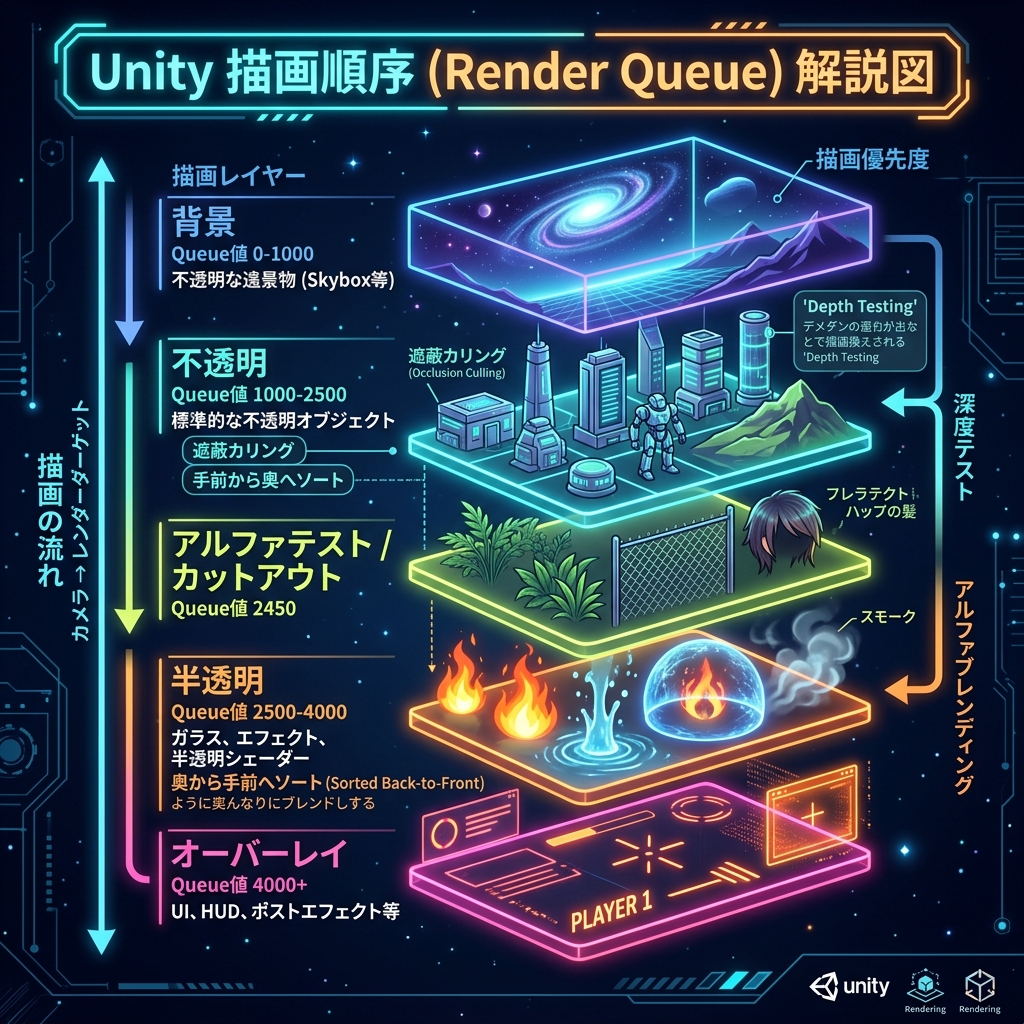
Figure: Conceptual diagram of render queue layers flowing from opaque drawing (Geometry) to translucent drawing (Transparent)
Mechanism and operating principle
In Unity, to increase drawing efficiency (reducing overdraw), opaque objects are drawn Front-to-Back'' to enable occlusion culling. On the other hand, semi-transparent objects should be drawn back-to-front in order to blend correctly. The Render Queue value separates the clear boundary between ``opaque'' and ``semi-transparent'' rendering timing.