Unity's built-in NavMesh is a powerful tool to quickly set up pathfinding for enemy characters and NPCs. However, when multiple NavMeshAgents crowd together in tight doorways or narrow corridors, you often run into critical behavior bugs: characters jitter and shake violently against each other, or get pushed through static wall colliders, falling out of the map boundaries. This article explains the technical reasons behind the conflict between the physics engine and RVO (Reciprocal Velocity Obstacles), and provides practical production-ready solutions.
1. Root Cause 1: Position Update Conflict Between NavMeshAgent and Rigidbody Physics
The primary driver of violent shaking and jitter is the conflict of coordinate updates between NavMeshAgent and Rigidbody/Collider physics on the same GameObject.
- NavMeshAgent Behavior: The agent component directly modifies the Transform
positionevery frame based on its pathfinding calculation. This bypasses the physics system. - Rigidbody/Collider Behavior: When characters collide, the physics engine (PhysX) calculates penetration resolution to push them apart, applying adjustments to the Transform position at the end of the physics loop (FixedUpdate).
When both systems run on the same object, it creates an infinite feedback loop: "Agent moves character forward to follow path, overlapping another character" ➔ "Physics engine detects overlap and pushes character back" ➔ "Next frame, Agent pushes character forward again". This tug-of-war on coordinates results in the visible shaking/jitter.
2. Root Cause 2: Avoidance Math Saturation in Crowded RVO States
To prevent agents from simply clipping through each other, NavMeshAgent utilizes the RVO (Reciprocal Velocity Obstacles) algorithm. RVO predicts potential collisions by scanning the velocities of surrounding agents and adjusting its own velocity vector accordingly.
However, in tight choke points where NPCs cannot escape, every direction results in a collision. The RVO algorithm saturates, causing avoidance velocity vectors to rapidly flip direction from frame to frame. This rapid directional switching amplifies the shaking.
When this violent RVO velocity spike combines with physics penetration force, the aggregate position delta in a single frame can exceed the thickness of static wall colliders, triggering a tunneling bug that pushes NPCs out of bounds.
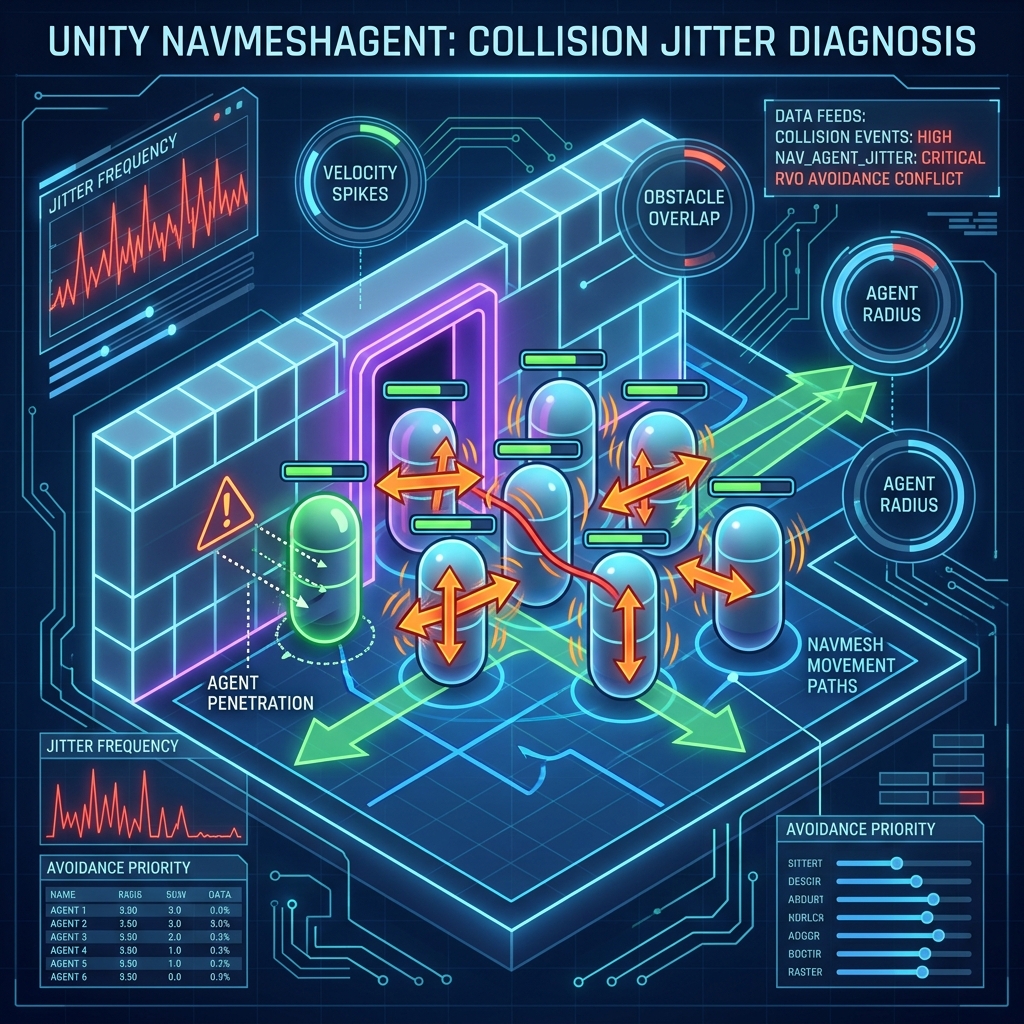
Diagram: Conflict mechanism between NavMeshAgent position updates and PhysX collision resolution.
3. Solution 1: Disabling Non-Kinematic Physics on NavMesh Agents
The golden rule for avoiding collision jitter and wall penetration is: never let the physics engine override the position of an active NavMeshAgent.
- If a character GameObject requires a
Rigidbody, set Is Kinematic totrue. - Set the character's
Colliderto Is Trigger = true, or adjust the physics layer matrix so that agents do not collide physically with other agents while still colliding with walls and hitboxes.
By preventing the physics solver from resolving overlaps, you eliminate the coordinate tug-of-war. The agent's built-in RVO avoidance or scripting will handle close proximity behaviors smoothly.
4. Solution 2: Dynamically Swapping Between NavMeshAgent and NavMeshObstacle
If you want NPCs to act as solid physical barriers that block and force other moving NPCs to walk around them when idle, implement a dynamic swap script.
When an NPC is moving, enable NavMeshAgent. Once the NPC stops moving, disable NavMeshAgent and enable NavMeshObstacle (with Carve set to true). This carves a hole in the navigation mesh, forcing other active agents to reroute around the static NPC instead of trying to walk through it.
Here is a C# script to handle this transition cleanly:
using UnityEngine;
using UnityEngine.AI;

[RequireComponent(typeof(NavMeshAgent))]
[RequireComponent(typeof(NavMeshObstacle))]
public class AgentObstacleSwitcher : MonoBehaviour
{
    private NavMeshAgent agent;
    private NavMeshObstacle obstacle;

    [SerializeField] float stopThresholdVelocity = 0.1f;
    [SerializeField] float idleSwitchDelay = 0.5f;

    private float lastMoveTime;

    void Awake()
    {
        agent = GetComponent<NavMeshAgent>();
        obstacle = GetComponent<NavMeshObstacle>();

        // Initialize agent active, obstacle inactive
        obstacle.enabled = false;
        obstacle.carving = true;
        agent.enabled = true;
    }

    void Update()
    {
        // When agent is moving
        if (agent.enabled)
        {
            if (agent.velocity.sqrMagnitude > stopThresholdVelocity * stopThresholdVelocity)
            {
                lastMoveTime = Time.time;
            }
            else if (Time.time - lastMoveTime > idleSwitchDelay)
            {
                // Switch to obstacle if velocity drops for a duration
                SwitchToObstacle();
            }
        }
        // Handle returning to Agent mode when new paths are assigned via external scripts
    }

    public void SetDestination(Vector3 targetPos)
    {
        if (obstacle.enabled)
        {
            SwitchToAgent();
        }
        agent.SetDestination(targetPos);
    }

    private void SwitchToObstacle()
    {
        agent.enabled = false;
        obstacle.enabled = true; // Carves NavMesh hole, forcing others to steer clear
    }

    private void SwitchToAgent()
    {
        obstacle.enabled = false;
        // Re-enabling the agent might need a 1-frame delay depending on NavMesh carve updates
        agent.enabled = true;
    }
}
5. Solution 3: Finetuning RVO Avoidance Parameters
You can also reduce the sensitivity of avoidance algorithms in the Inspector to stabilize crowds:
- Avoidance Quality: The default is `High Quality`. In heavy agent crowds, this makes calculations highly sensitive, leading to jitter. Lowering this to `Low Quality` or `None` reduces sudden micro-shakes, creating smoother paths.
- Priority: Assign lower priority values (0 is highest priority) to large or important NPCs (like bosses). This forces minor agents to yield the path, avoiding mutual collision calculations.
Summary
Resolving NavMeshAgent jitter and wall clipping boils down to eliminating physics engine overlap resolution (using Kinematic setups) and dynamically carving the NavMesh using NavMeshObstacle when stationary. Aligning these settings keeps your NPC interactions smooth, stable, and inside the map boundaries.