Mixed Lighting is the lowest-cost way to achieve both static lighting for the background (lightmap baking) and real-time shadows for dynamic characters, but overlapping shadows and border problems are likely to occur due to inconsistent settings in the URP.
Specific solution
1. Switch the lighting mode to "Shadowmask"
Open the Window ➔ Rendering ➔ Lighting window and change the Mixed Lighting Mode of the current active lighting setting from `Subtractive` to **`Shadowmask`** Change it to and rebake.
2. Allow shadow mask on the URP Asset side
Open the inspector of the active URP Asset and make sure to enable (ON) the checkbox of Shadows ➔ Mixed Lighting.
[URP Asset Shadows]
☑ Mixed Lighting  <-- これを有効化する
*As a result, in areas of static baked shadows (where the shadow mask texture value is close to 0), the real-time shadow attenuation of dynamic objects is automatically synthesized as a mask, completely resolving the phenomenon of shadows becoming double dark.
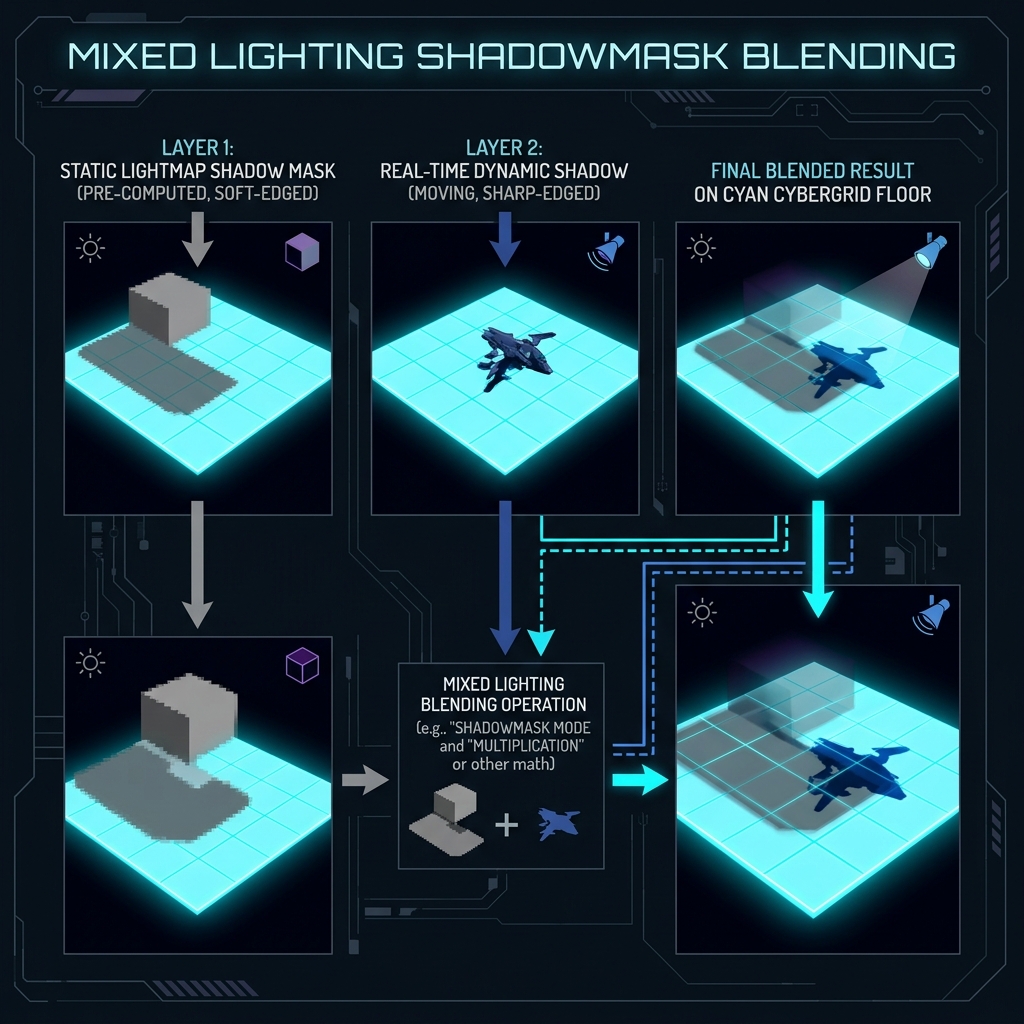
Figure 1: How Shadowmask mode seamlessly blends baked and real-time shadows