Niagara fire tutorial: rising flames, sparks and smoke
Build fire in UE 5.8 Niagara with asset steps, material diagrams, emitter settings, motion, timing and beginner troubleshooting.
Filter tutorials, troubleshooting and shared fundamentals.
285 articles
 Beginner
Build fire in UE 5.8 Niagara with asset steps, material diagrams, emitter settings, motion, timing and beginner troubleshooting.
 Beginner
Build water in UE 5.8 Niagara with asset steps, material diagrams, emitter settings, motion, timing and beginner troubleshooting.
 Beginner
Build ice in UE 5.8 Niagara with asset steps, material diagrams, emitter settings, motion, timing and beginner troubleshooting.
 Intermediate
Build lightning in UE 5.8 Niagara with asset steps, material diagrams, emitter settings, motion, timing and beginner troubleshooting.
 Intermediate
Build wind in UE 5.8 Niagara with asset steps, material diagrams, emitter settings, motion, timing and beginner troubleshooting.
 Beginner
Build earth / rock in UE 5.8 Niagara with asset steps, material diagrams, emitter settings, motion, timing and beginner troubleshooting.
 Intermediate
Build light in UE 5.8 Niagara with asset steps, material diagrams, emitter settings, motion, timing and beginner troubleshooting.
 Intermediate
Build darkness in UE 5.8 Niagara with asset steps, material diagrams, emitter settings, motion, timing and beginner troubleshooting.
 Beginner
A beginner fire VFX recipe with asset creation, Unity URP setup, starting values, expected results and troubleshooting.
 Beginner
A beginner water VFX recipe with asset creation, Unity URP setup, starting values, expected results and troubleshooting.
 Beginner
A beginner ice VFX recipe with asset creation, Unity URP setup, starting values, expected results and troubleshooting.
 Beginner
A beginner lightning VFX recipe with asset creation, Unity URP setup, starting values, expected results and troubleshooting.
 Beginner
A beginner wind VFX recipe with asset creation, Unity URP setup, starting values, expected results and troubleshooting.
 Beginner
A beginner earth / rock VFX recipe with asset creation, Unity URP setup, starting values, expected results and troubleshooting.
 Beginner
A beginner light VFX recipe with asset creation, Unity URP setup, starting values, expected results and troubleshooting.
 Beginner
A beginner darkness VFX recipe with asset creation, Unity URP setup, starting values, expected results and troubleshooting.
 Beginner
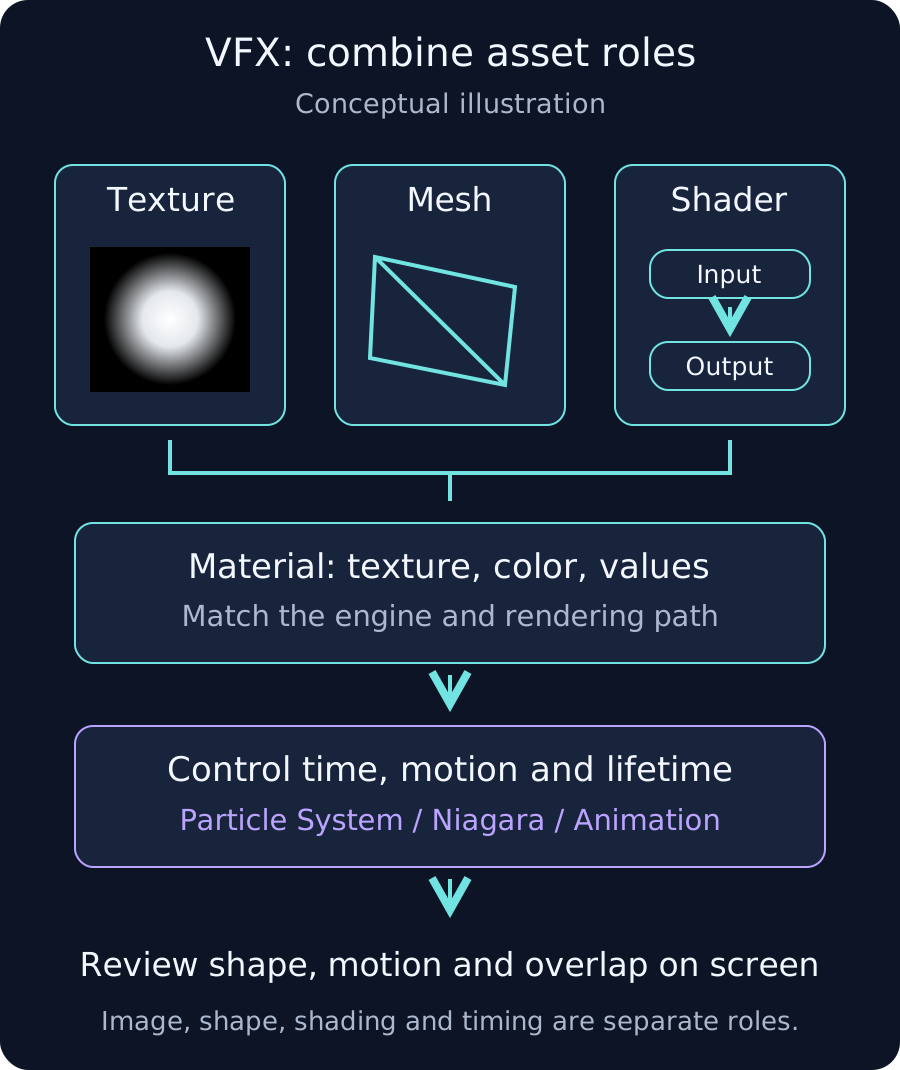
Learn VFX texture, mesh and shader roles, elemental design, and workflows for Photoshop, After Effects, Blender, Unreal Engine and Unity.
 Beginner
Understand VFX color maps, masks, noise and flipbooks, including RGB versus alpha, UVs, color space, resolution and compression.
 Beginner
Choose VFX planes, rings, cones and strips, with UVs, pivots, face orientation and subdivisions matched to the intended motion and silhouette.
 Beginner
Understand VFX shaders versus materials, alpha/additive blending, UV motion, particle color and the different Unity and Unreal workflows.
 Intermediate
Design elemental VFX using texture edges, geometry, acceleration and persistence, with practical comparisons for eight elemental themes.
 Beginner
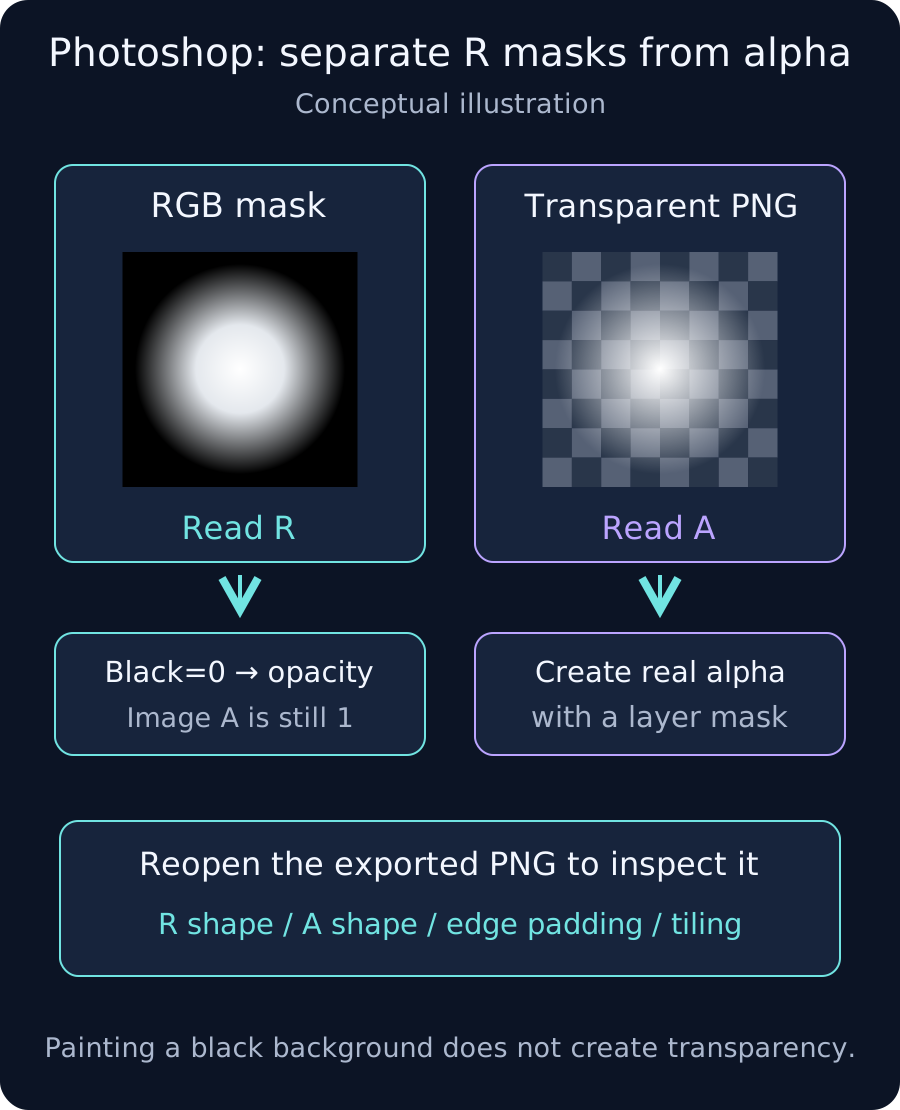
Create a Photoshop grayscale VFX mask, distinguish RGB from alpha, check tiling and export PNGs with a clear import contract.
 Intermediate
Build looping Fractal Noise, export 16 PNG frames and arrange a 4×4 VFX flipbook, checking alpha, duplicate endpoints and cell borders.
 Beginner
Model a 16-segment ring in Blender 4.5 LTS, project its UVs and check face direction, pivot, scale and FBX import into your game engine.
 Intermediate
Build a legacy UE 5.6 unlit translucent VFX material using an R mask, tint, opacity, Panner and Material Instances.
 Intermediate
Build a Unity 2022.3 URP 14 Unlit Shader Graph with an R mask, tint, alpha and scrolling UVs, then check particle-color integration.
 Beginner
Diagnose missing Unity 3D trigger events through collider/body pairing, layers, ignored pairs, callback placement and physics simulation.
 Intermediate
Resolve uGUI size and position resets by tracing Layout Groups, Content Size Fitter, size inputs and separate layout Slots from animated Visuals.
 Intermediate
Diagnose late or missing Animator transitions through parameters, Exit Time, all Conditions, blend duration, competing transitions and update state.
 Intermediate
Trace Renderer.material copies, sharedMaterial edits, PropertyBlock scope and owned cleanup; verify Material counts and SRP Batcher performance separately.
 Beginner
Diagnose paused UI and waits using deltaTime, unscaledDeltaTime, WaitForSecondsRealtime and Animator settings, with explicit pause and resume ownership.
 Intermediate
Trace blurry Unity textures through source pixels, platform Max Size, Quality mip limits, Streaming, filters, UVs and output resolution.
 Beginner
Trace unresponsive uGUI buttons through the EventSystem, input module, GraphicRaycaster, transparent panels, CanvasGroup settings and On Click.
 Intermediate
Diagnose missing URP Bloom by checking emission output, HDR buffers, Camera post-processing, Volume application, Threshold and Intensity.
 Beginner
Compare Local, World and Custom Particle System simulation with one Burst, then inspect Trails, Inherit Velocity and old particles during pooled reuse.
 Intermediate
Trace Quality overrides and the Graphics default, log the selected URP asset, then check Renderer and Camera settings when changes have no effect.
 Intermediate
Check normal-map import, single decoding in Shader Graph, green-channel conventions, and mesh tangents and UVs when detail looks inverted or shading breaks.
 Advanced
Separate ReadPixels GPU waits from PNG encoding and file writes. Check async support, bound requests, manage data lifetime and verify in the target Player.
 Advanced
IL2CPP ExecutionEngineException: check AOT code and stripping. Missing AOT implementations and stripped reflection targets are separate problems. IL2CPP support
 Intermediate
Optimize Unity URP rendering with the SRP Batcher. Check compatibility, shader variants and Frame Debugger batches, then measure CPU rendering cost.
 Intermediate
Diagnose stalls during asynchronous scene transitions. Async loading can still incur activation, object lifecycle, asset cleanup, and GC work on the main thread
 Intermediate
Measure and reduce allocations from LINQ and lambdas. LINQ iterators, result collections, sorting, delegates, and captures can add allocations or CPU work. Not
 Intermediate
Measure and consolidate many Update callbacks. Large numbers of MonoBehaviour callbacks add native-to-managed overhead and repeated work. Profile first to decid
 Intermediate
Reuse cells in large ScrollRect lists. Creating every ScrollRect cell increases memory, layout, and update work; layout cost is not necessarily exponential.
 Intermediate
Reduce uGUI GraphicRaycaster CPU cost. Many UI raycast candidates can increase CPU cost. Inspect candidates, raycasters, input-module behavior, and blocking set
 Intermediate
Cancellation and object lifetime with async/await and UniTask. Accessing a destroyed object after await can fail. Cancellation is cooperative: the awaited opera
 Advanced
Check URP pass timing and input buffers. A missing renderer feature can involve renderer selection, camera type, layer/queue/pass filters, input availability, a
 Intermediate
Object pooling: lifecycle and memory considerations. Repeated creation/destruction costs initialization, native work, and managed allocations. Pooling reduces t
 Intermediate
Edit and save prefab assets from Editor tools. Editing a prefab asset differs from recording an instance override. Confusing the targets can lose changes.
 Intermediate
Diagnose blurry UI with URP render scale. UI drawn into a downscaled camera target becomes blurry when that target is enlarged. UI resolution depends on its ren
 Intermediate
Check URP decal distortion, projection, and visibility. A decal projector affects compatible surfaces in its volume. Excess depth, projection angle, or unsuppor
 Intermediate
Check model and shadow artifacts during LOD cross-fades. LOD cross-fading requires support in both LOD Group and the shader. Check the installed URP/Shader Grap
 Intermediate
Fix transparent shadow issues in Unity URP Shader Graph: separate receiving from casting, check Lit and renderer settings, and choose a shadow proxy.
 Intermediate
Adjust shadow bias for acne and detached shadows. Shadow acne involves self-shadow depth error; jagged outlines often involve shadow texel density. Increasing b
 Intermediate
Diagnose black output, UI, and XR issues in Full Screen Pass. A fullscreen effect needs a valid color copy and appropriate injection timing. An unsafe custom pa
 Intermediate
Fix Unity 2D sprite jitter by checking Pixel Perfect Camera, PPU, integer scaling, Rigidbody2D interpolation and Cinemachine camera timing.
 Intermediate
Check missing or flickering lights in URP Forward+. Forward+ still has platform-dependent visible-light limits. A universal 32-lights-per-tile limit is not an a
 Intermediate
Persist ScriptableObject edits in Editor tools. Editor changes to ScriptableObject assets need suitable undo/dirty/save handling. Runtime changes in a build do
 Advanced
Reconstruct normals after vertex displacement. Moving vertices does not automatically deform their normals or tangents. Reconstruct them in a consistent space u
 Intermediate
Check MSAA in URP camera stacks. Overlay cameras share stack targets. It is not a general rule that MSAA always resolves after the Base camera and disables it f
 Advanced
Check Custom Function and SRP Batcher compatibility. Shader Graph generates its material constant buffer. Redeclaring UnityPerMaterial or duplicating graph prop
 Advanced
Investigate VFX Graph memory use and OOM. VFX memory depends on capacity, stored attributes, auxiliary buffers, sorting, and concurrent instances. Attribute siz
 Advanced
Restore values and release resources in PlayableBehaviour. A custom playable can leave its last value behind when evaluation stops. Residual state is distinct f
 Intermediate
Diagnose dark or overbright RenderTexture previews. Separate texture format/sRGB conversion from exposure, tonemapping, and display shader differences. RawImage
 Beginner
Check shadow distance when distant URP shadows disappear. Realtime shadows stop at configured distance limits. Cascades mainly distribute directional-shadow pre
 Intermediate
URP particle transparency and material settings. Check shader compatibility, surface type, blending, and sorting separately. Depth writes are usually off for tr
 Advanced
Diagnose first-play particle spikes in Timeline. First-play spikes may involve GPU program preparation, asset loading/creation, particle pre-simulation, or play
 Intermediate
Check URP depth texture generation and conversion. Depth effects need the correct generation setting, camera override, sampling time, and depth-writing objects.
 Intermediate
Check URP decals that fail to project onto a target. Check the decal feature, projector volume, compatible receiver shader, and rendering technique. A Receive D
 Beginner
Particle scaling modes and parent transforms. Scaling Mode determines how transform scale affects particles; it differs from Simulation Space.
 Intermediate
Check transparent Particle System sorting. Typical transparents test depth without writing it and blend back to front. Renderer-level sorting cannot fully resol
 Advanced
Check bounds when VFX Graph disappears with camera motion. If VFX bounds do not enclose the effect, visible particles can be culled when the bounds leave the fr
 Intermediate
Check VFX Graph events that do not spawn particles. Event names, graph wiring, spawn behavior, capacity, and bounds determine whether particles appear. Events d
 Advanced
Diagnose HLSL compilation errors in Custom Function nodes. Custom Function File and String modes use different function-definition conventions. Check precision
 Intermediate
Diagnose dark transparent edges in RenderTexture UI. Dark fringes occur when premultiplied colors are displayed with straight-alpha blending, multiplying alpha
 Advanced
Check shaders that fail in one eye with single-pass instancing. One-eye artifacts can arise from missing stereo information or incorrect screen-texture sampling
 Advanced
Fix Unity URP SRP Batcher incompatibility by checking UnityPerMaterial, shader passes and MaterialPropertyBlock, then verify the affected draw.
 Advanced
Measure post-processing cost on mobile and Quest. Bloom and depth of field can add intermediate/fullscreen work, but not every effect, such as vignette, creates
 Intermediate
Pass particle and mesh vertex colors to shaders. Particle color and source-mesh vertex color are distinct data. Match the Color stream with shader input and mul
 Advanced
Reduce Particle System noise CPU cost. Noise adds simulation work depending on particle count, quality, and octaves. Separate simulation cost from rendering cos
 Intermediate
Soft particles: fade intersections using consistent depths. Soft particles fade from the gap between scene and particle depth in the same linear space. Raw scre
 Advanced
Check RenderTexture color conversion, HDR, and output paths. Separate texture format/sRGB conversion from exposure, tonemapping, and display shader differences.
 Advanced
Diagnose missing objects in custom URP passes. A missing renderer feature can involve renderer selection, camera type, layer/queue/pass filters, input availabil
 Advanced
Tune peripheral quality with fixed foveation on Quest. FFR reduces peripheral shading density and can expose artifacts at aggressive levels. Its fixed center is
 Beginner
Check player build errors from UnityEditor references. Gizmos belongs to UnityEngine, unlike UnityEditor.Handles. Editor Scene and Game views can display gizmos
 Beginner
Check screen-space camera UI and 3D ordering. Canvas hierarchy, renderer sorting, and depth tests are separate mechanisms. CanvasGroup has no Sorting Order, and
 Beginner
Update VFX Graph properties from C#. Check exposure, exact property name, type, graph connections, and competing writers. Do not assume Shader Graph display/ref
 Beginner
Manage URP Rendering Debugger availability in builds. Rendering Debugger is a diagnostic feature for the editor and development builds. Do not assume its UI nec
 Intermediate
Check post-processing volume blending and transitions. Local volume blending depends on collider distance, blend distance, weight/priority, overrides, and camer
 Advanced
Check textures assigned to VFX Graph. Check exposed texture dimension/type, wiring, UVs, and data color space. Converting every input to Texture2D is not a vali
 Advanced
Shader Graph vertex animation and SRP Batcher. The SRP Batcher reduces CPU work preparing draws. It does not automatically reduce draw count. Vertex animation,
 Intermediate
Define RenderTexture ownership and release resources. Check ownership, references, allocation frequency, and cleanup. Destroy is not categorically unable to fre
 Advanced
Check per-eye sampling in XR post-processing. SPI/Multiview can use per-eye texture arrays. Use pipeline-compatible inputs rather than copying Built-in screen m
 Intermediate
Distinguish skinned-mesh emission from particle attachment. Particle System can emit directly from a Skinned Mesh Renderer shape. Manually baking a mesh every f
 Beginner
Check Game-view gizmos and runtime debug rendering. Gizmos belongs to UnityEngine, unlike UnityEditor.Handles. Editor Scene and Game views can display gizmos, b
 Intermediate
Apply fog to transparent URP particles. For mismatched fog, check shader fog support and blending mode. Background scene depth is not automatically the particle
 Advanced
Multiple materials, submeshes, and the SRP Batcher. The SRP Batcher reduces CPU work preparing draws. It does not automatically reduce draw count. Vertex animat
 Intermediate
Diagnose position and pose drift in Timeline loops. Separate root motion, track offsets, clip loop continuity, and competing transform writers. Enabling Apply R
 Advanced
Diagnose audio and visual timing in Timeline. Timeline and audio clock differences can affect synchronization during pauses or time-scale changes. DSP Clock doe
 Beginner
Set post-playback state in Timeline activation tracks. Activation Track uses its Post-playback state to define activation after stopping. Changing director Wrap
 Advanced
Prevent reimport loops in AssetPostprocessor. Repeated reimport requests inside import callbacks can restart refresh loops. Changes must converge rather than co
 Intermediate
Release EditorWindow resources across close and reload. Editor-created textures/materials have native resources. Clearing a reference does not replace their des
 Intermediate
Fix UnityEditor reference errors after adding asmdefs. Assembly boundaries need explicit Editor separation and the correct dependency direction. An Editor folde
 Advanced
Check transparent VFX sorting and renderer order. Transparent particle order depends on output sorting and blending. VFX Graph does not universally disable sort
 Advanced
Check supported GPU collision inputs in VFX Graph. GPU VFX collision does not automatically share every CPU physics collider. Check the selected collision block
 Advanced
Spawn child VFX systems through GPU events. Particle System Sub Emitters and VFX Graph GPU-event child systems are different workflows. VFX needs the appropriat
 Advanced
Check custom interpolator types, spaces, and interpolation. A custom interpolator carries interpolated vertex values to fragments. Space mismatches and varying
 Intermediate
Check triplanar coordinates, scale, and blending. Triplanar blends three projections using the normal. Increasing Blend sharpens the dominant projection; values
 Advanced
Check view and normal spaces for Fresnel in VR. Some left/right rim differences are normal parallax. The standard Fresnel node is not inherently VR-incompatible
 Intermediate
Check mixed-light shadow overlap and leakage. Check baked data, light modes, receivers, and mixed-lighting shader logic. There is no general requirement to add
 Advanced
Check device support for VFX strip outputs. Separate API/package/device support from strip capacity and attributes. A specific GPU synchronization defect requir
 Intermediate
Check URP stencil passes, shared targets, and ordering. Stencil failures can involve pass support, ordering, references/masks, or target sharing. URP does not u
 Advanced
Check repeated Timeline signal dispatch. Duplicate signals can come from multiple emitters, receivers/directors, loops, seeks, or retroactive settings. Low FPS
 Advanced
Isolate Quest multiview, fixed foveation, and peripheral artifacts. FFR reduces peripheral shading density and can expose artifacts at aggressive levels. Its fi
 Intermediate
SRP Batcher reduces CPU preparation cost for draws using the same shader variant.
 Beginner
Sorting Fudge biases a particle renderer against other systems. Smaller values tend to draw it in front.
 Advanced
FFR shades a fixed central region more densely than peripheral regions.
 Intermediate
A depth texture exposes camera-view depth per pixel.
 Beginner
Q&A: pink URP materials and shader errors. Magenta indicates an unusable shader. Pipeline mismatch, compile errors, unsupported APIs, and missing variants are p
 Intermediate
Q&A: disappearing VFX and bounds. If VFX bounds do not enclose the effect, visible particles can be culled when the bounds leave the frustum. The culling volume
 Advanced
Q&A: release RenderTextures and prevent leaks. Check ownership, references, allocation frequency, and cleanup. Destroy is not categorically unable to free GPU r
 Beginner
Control Particle System playback and seeking in Timeline. Activation tracks toggle active state. Timeline-controlled particle simulation requires a control trac
 Beginner
Render Queue. Render Queue assigns shader/material rendering groups and ordering. The pipeline then sorts within groups such as Geometry or Transparent.
 Intermediate
GPU instancing draws compatible objects sharing geometry/material with per-instance transforms and attributes.
 Advanced
Variable Rate Shading (VRS). Variable rate shading changes shading frequency across regions and can reduce GPU work by evaluating some areas more coarsely.
 Intermediate
Custom Function calls HLSL from Shader Graph. String mode takes a body, while File mode references a function with matching ports and precision.
 Beginner
Prewarm advances a looping particle system to an established state before presentation.
 Beginner
Frustum Culling. Frustum culling excludes renderers outside the camera view, generally using their bounds.
 Beginner
Mipmap. Mipmaps are progressively smaller images used during texture minification to reduce aliasing and sampling cost.
 Advanced
Scriptable Renderer Feature. A Scriptable Renderer Feature extends a URP renderer with custom rendering work, enabled on its Renderer Data.
 Advanced
HLSL describes GPU programs such as shaders; Unity translates/compiles it for target platforms.
 Beginner
Billboards orient a plane toward the camera or another chosen direction, useful for particles and distant objects.
 Advanced
Deferred shading records surface properties in a G-buffer before evaluating lighting.
 Advanced
Forward+ selects relevant lights per screen region or cluster before forward shading.
 Beginner
A rendering pipeline organizes culling, shadows, draws, and post-processing. Built-in, URP, and HDRP have different APIs and features.
 Intermediate
ZTest compares fragment depth with stored depth using a selected comparison function.
 Intermediate
ZWrite stores depth for use by later depth tests.
 Advanced
Stencil Buffer. A stencil buffer stores per-pixel integer values for masking through writes and comparisons.
 Intermediate
Overdraw (overdraw / duplicate drawing). Overdraw repeatedly processes overlapping surfaces at the same pixels, particularly costly for transparency.
 Beginner
Anisotropic filtering improves texture sampling on oblique surfaces, such as roads or floors.
 Intermediate
Color Space. Color space describes how values represent brightness. A linear workflow decodes color textures for lighting calculations.
 Beginner
LOD selects geometry detail according to visibility size or another policy; Unity LOD Group uses relative screen size.
 Intermediate
Occlusion culling skips hidden renderers; Unity baked occlusion uses suitable occluder/occludee configuration.
 Beginner
Post-processing applies effects such as bloom and grading to rendered images using a supported volume/camera setup.
 Intermediate
A render texture is a GPU rendering target used by cameras and intermediate passes.
 Beginner
A draw call asks the GPU to render geometry; materials, submeshes, and passes can increase counts.
 Intermediate
Batching processes compatible objects with shared rendering work.
 Beginner
Simulation Space. Simulation space controls the coordinate system of particle state; local particles follow the system transform, while world particles retain w
 Advanced
A vector field assigns directions or velocities across space and can drive particle motion.
 Beginner
Particle lifetime sets lifespan; age/lifetime drive changes and expiration.
 Beginner
Emission rate controls spawning per time or distance; distinguish the corresponding modes.
 Beginner
Bursts spawn groups at selected times with supported count, repetition, and probability controls.
 Advanced
GPU particles update state such as positions, velocities, and lifetimes on the GPU.
 Advanced
A point cache stores sampled points and attributes for uses such as VFX particle placement.
 Intermediate
A sub-emitter spawns child effects from parent-particle events.
 Intermediate
Particle collision detects contact and can bounce, stop, or kill particles.
 Intermediate
A noise field evaluates spatial/temporal noise to influence particle motion.
 Beginner
Render mode selects particle geometry such as billboards, stretched billboards, or meshes.
 Intermediate
A ribbon renders a strip joining a sequence of points.
 Beginner
Trails connect position history using systems such as TrailRenderer or particle trails.
 Beginner
Inherit Velocity transfers emitter motion to particles; inspect supported initial/current modes.
 Intermediate
Soft Particles. Soft particles fade intersections using the gap between particle and scene depth.
 Intermediate
A vertex shader computes positions and attributes per vertex, including transforms and deformation.
 Intermediate
A fragment shader evaluates rasterized fragments for color, lighting, and related outputs.
 Beginner
Fresnel describes angle-dependent reflectance. The graph node provides an approximate angular weight useful for rims.
 Beginner
Normal maps encode surface-normal detail without adding geometry.
 Beginner
UV Coordinates. UVs are two-dimensional texture coordinates obtained from mesh data or calculations.
 Beginner
PBR models light/material interaction using physically motivated parameters such as metallic and roughness.
 Beginner
Alpha clipping keeps or discards fragments according to a threshold, useful for cutout foliage.
 Beginner
Vertex color stores color or mask values per vertex.
 Advanced
Triplanar Projection. Triplanar mapping blends three axis projections weighted by surface normals.
 Advanced
Shader variants are programs for keyword combinations, trading feature selection against build/runtime preparation cost.
 Advanced
Single-pass instanced stereo shares some work while shaders handle per-eye information.
 Intermediate
XR multipass renders each eye separately; distinguish it from shaders with multiple general rendering passes.
 Beginner
Graphics memory holds textures, meshes, targets, and other GPU resources.
 Intermediate
Fillrate concerns pixel/fragment throughput, limited by shading, blending, bandwidth, resolution, and hardware.
 Intermediate
Draw-call batching groups compatible rendering work through approaches with different restrictions.
 Beginner
The profiler measures runtime work and memory using CPU timelines, GPU modules, and other views.
 Beginner
Frame rate counts frames per second; 60 FPS corresponds to roughly 16.7 ms per frame. Inspect slow frames too.
 Beginner
A bottleneck is the stage limiting progress; compare CPU, GPU, I/O, and other work to choose a target.
 Beginner
LOD Group switches renderers according to relative screen size.
 Advanced
Shader compilation translates source for target APIs; keyword and rendering paths affect program counts.
 Beginner
Static batching combines static geometry to reduce rendering overhead.
 Intermediate
Dynamic batching combines suitable small meshes using CPU work, subject to vertex-attribute and shader restrictions.
 Advanced
A command buffer records GPU work such as rendering and copies.
 Advanced
A G-buffer stores surface attributes for deferred lighting.
 Beginner
A depth buffer stores depth for visibility testing through ZTest/ZWrite.
 Intermediate
A framebuffer groups rendering attachments such as color/depth for screen or intermediate targets.
 Intermediate
A shadow map stores light-view depth for comparison with receiver depth to estimate visibility.
 Advanced
Shadow cascades divide directional shadows by camera distance to allocate precision near the viewer.
 Advanced
A shadowmask stores baked occlusion for mixed lights.
 Beginner
A lightmap stores precomputed illumination for mainly static surfaces.
 Intermediate
Light probes store baked lighting at spatial samples for interpolation onto moving objects.
 Intermediate
A reflection probe captures surrounding cubemap data for material reflections using supported baked/realtime modes.
 Beginner
A skybox renders the scene background and can supply environment lighting/reflection inputs.
 Beginner
HDR rendering preserves values outside the usual 0–1 range using suitable formats.
 Beginner
Bloom extracts/spreads bright contributions and composites a glow.
 Advanced
ACES is a color-management system; Unity offers an ACES-inspired tonemapping transform.
 Intermediate
Tonemapping maps broad scene intensities into an output range with an appropriate transform and exposure.
 Beginner
Vignette adjusts image edges, commonly darkening them.
 Beginner
Chromatic aberration simulates color fringing from wavelength-dependent lens refraction.
 Intermediate
Depth of field blurs out-of-focus areas using controls available in the selected mode.
 Beginner
Motion blur smears movement, with camera/object support depending on pipeline.
 Intermediate
Ambient occlusion approximates reduced ambient light near geometry using baked or screen-space methods.
 Advanced
Screen-space Reflections (SSR). Screen-space reflections approximate reflections from visible color/depth data.
 Advanced
TAA combines current/history samples, commonly using motion vectors and jitter in supported implementations.
 Intermediate
MSAA smooths polygon coverage using multiple samples.
 Beginner
FXAA smooths detected edges in the rendered image and can have low overhead.
 Intermediate
SMAA analyzes edge patterns to blend appropriate samples in supported camera settings.
 Beginner
Render scale multiplies target dimensions; 0.5 halves each dimension and gives about one-quarter as many pixels.
 Advanced
Dynamic resolution changes rendering resolution at runtime.
 Advanced
A compute shader runs parallel GPU work through dispatched thread groups, independent of ordinary draw passes.
 Advanced
StructuredBuffer exposes structured elements to shaders; supported RW forms allow writes.
 Advanced
Custom Interpolator. A custom interpolator transfers vertex-calculated values to graph fragment processing.
 Advanced
Parallax mapping offsets texture coordinates according to height and viewing direction.
 Beginner
Detail maps add fine color/normal information through compatible material features.
 Beginner
Emission adds a material self-emissive contribution and can feed bloom or supported GI.
 Beginner
Smoothness controls reflection-lobe width, generally making reflections sharper at higher values.
 Beginner
Metallic describes conductor versus dielectric behavior in a metallic PBR workflow.
 Intermediate
An occlusion map masks occlusion, typically reducing supported indirect-light contributions.
 Advanced
Tessellation (polygon subdivision). Tessellation subdivides geometry through supported GPU stages.
 Advanced
A geometry shader can emit primitives from input primitives.
 Beginner
Backface culling excludes triangles facing away from the view.
 Beginner
Blend mode specifies how source and destination colors combine, including alpha and additive formulations.
 Beginner
Additive blending adds color contributions for luminous effects.
 Beginner
Multiplicative blending multiplies destination color by source color, for example with DstColor Zero.
 Beginner
Straight alpha blending weights source by alpha and destination by one minus alpha.
 Advanced
A render pass is a rendering stage with defined inputs, outputs, and placement in compatible URP APIs.
 Advanced
GPU-driven rendering moves some preparation/culling work to the GPU.
 Advanced
Ray tracing computes effects such as reflections/shadows using ray–geometry intersections.
 Beginner
Shader Graph builds shader calculations from nodes for a selected pipeline/target.
 Intermediate
Instanced drawing renders common geometry with multiple transforms/attributes.
 Advanced
Deferred lighting names techniques that separate surface and later lighting work; distinguish it from a specific deferred-shading implementation.
 Beginner
Forward rendering evaluates lighting while shading objects.
 Advanced
Tile-based deferred techniques organize deferred work by screen tiles and can select relevant lights per tile.
 Advanced
Clustered rendering partitions view space in XY and depth to select relevant lights.
 Intermediate
GPU skinning computes bone-driven deformation through a supported GPU rendering path.
 Intermediate
CPU skinning computes bone-driven vertex deformation on the CPU.
 Beginner
Root motion applies animation-derived root translation/rotation to an object.
 Beginner
A blend tree mixes motions according to animator parameters and configured thresholds/blend type.
 Beginner
An animator controller organizes states, transitions, parameters, and layers.
 Intermediate
A Timeline control playable manages supported systems such as particles/directors on its source object.
 Intermediate
Addressables (Addressable Asset System). Addressables locates/loads resources through catalogs and manages referenced operations/handles.
 Advanced
An asset bundle packages built Unity assets for runtime delivery/loading with platform and dependency management.
 Beginner
A sprite atlas packs multiple sprite images into shared textures.
 Intermediate
Mipmap bias adjusts selected levels; negative values generally favor detail, positive values coarser levels.
 Advanced
Texture streaming manages mip residency according to demand and memory budgets.
 Advanced
Virtual texturing maps required tiles of large virtual textures into physical storage.
 Advanced
An occlusion query asks the GPU about visibility to guide later work.
 Advanced
Early-Z can reject occluded fragments before expensive shading.
 Advanced
Stencil Test. A stencil test compares stored values with references/masks and can update values through configured operations.
 Beginner
Color grading adjusts exposure, contrast, and color treatment through compatible controls or LUTs.
 Intermediate
A LUT maps input values to outputs; grading LUTs encode color transforms.
 Beginner
White balance compensates illumination color casts using supported temperature/tint controls.
 Beginner
Shadow distance limits realtime shadow range, configured on the active asset/path.
 Advanced
Contact shadows approximate fine shadowing near contact regions.
 Advanced
Micro shadowing approximates fine-scale surface masking from suitable material information.
 Advanced
Ray-traced shadows use ray intersections to evaluate occlusion.
 Advanced
HBAO estimates ambient occlusion from screen-space horizon information.
 Intermediate
Dithering distributes values into patterns to reduce visible quantization or transitions.
 Intermediate
A flow map encodes directions used to animate texture coordinates or other flow effects.
 Beginner
Color temperature expresses illuminant color using a blackbody-based model; lower Kelvin appears warmer, higher cooler.
 Intermediate
Diagnose light leakage through thin URP walls. Light leaks can involve bias, resolution, one-sided geometry, shadow casters, or baked GI. One bias value does no
 Advanced
Investigate long shader builds and variant counts. Keyword combinations increase shader variants. Long compilation is not automatically a freeze or infinite loo
 Intermediate
Check particle renderer order and internal sorting. Typical transparents test depth without writing it and blend back to front. Renderer-level sorting cannot fu
 Intermediate
Reduce uGUI canvas rebuild and layout cost. UI changes can dirty individual graphics and trigger canvas batch rebuilds. Not every change necessarily regenerates
 Advanced
Check Android ASTC support, fallback, and memory. Unsupported ASTC can fall back to uncompressed textures and increase memory usage. Unsupported compression doe
 Advanced
Investigate asmdef dependencies and repeated compilation. Separate a slow compilation, a reference error, and compilation repeatedly restarting. Circular asmdef
 Advanced
Release Addressables handles and instances correctly. Addressables uses reference counts. Unbalanced loads/releases retain resources, but reaching zero does not
 Advanced
Tune fixed foveation when Quest peripheral quality degrades. FFR reduces peripheral shading density and can expose artifacts at aggressive levels. Its fixed cen
 Intermediate
Check CCD, geometry, and movement for fast rigidbodies. Discrete detection can miss thin obstacles between physics steps. Direct transform movement and collider
 Intermediate
Check initial poses and camera jumps at Timeline start. T-poses can involve bindings, unevaluated starting poses, avatars, or animation culling. Cinemachine fol
 Intermediate
Check Scene Color refraction and transparent capture timing. URP Scene Color samples the opaque texture captured before transparents. Moving a transparent objec
 Intermediate
Check missing TMP glyphs and dynamic atlas capacity. Distinguish missing source-font glyphs from a full dynamic atlas. Adding an automatic atlas-clearing event
 Intermediate
Check NavMeshAgent jitter and competing movement systems. Agents, dynamic rigidbodies, and root motion can compete for one transform. Navigation geometry and Ph
 Intermediate
Separate I/O, decompression, and creation stalls in Addressables. LZMA uses whole-stream decompression while LZ4 permits chunk-based reads. Async APIs can still
 Intermediate
Investigate WebGL out-of-memory errors and retained assets. Separate Wasm heap pressure, asset expansion, GPU memory, and browser limits. An old fixed WebGL Mem
 Intermediate
Identify closure and delegate allocations. A lambda capturing an outer local can allocate captured-state storage and a delegate. Distinguish this from noncaptur
 Intermediate
Smooth procedural edges with ddx, ddy, and fwidth. Hard thresholds or fixed UV smoothing widths can mismatch pixel size. Derivatives estimate local screen-space
 Intermediate
Reduce UI overdraw coverage and GPU time. Layered UI can increase GPU work, but zero-alpha graphics are not always drawn; transparent-mesh culling and CanvasGro
 Intermediate
Check mobile VFX Graph support and fallback effects. VFX Graph requires supported compute/graphics features and package-specific APIs. supportsComputeShaders or
 Beginner
Static values and events survive Play sessions: diagnosis and reset. Disabling domain reload preserves static state across sessions; explicit reset and unsubscr
Learn how to distinguish GC allocations from collection work and investigate frame spikes in Unity.
Understand height-dependent fog and why configuration differs between Unity render pipelines.
Investigate thermal throttling with sustained device measurements and workload adjustments.
Try another keyword, category, or engine.